Mercator Protocol
The Mercator protocol defines a pulse sequence (a QICK program) as a set of key-value pairs, typically written in YAML or as a Python dictionary. To execute it, use the quick.Mercator class.
Note: Avoid using
{}in YAML, as it can conflict withquick.evalStr.
The protocol uses defaults and syntax sugar for flexibility and ease of use. This document lists default values, and REQUIRED properties are marked.
The protocol has four main sections: - Meta Information - Pulse Setup - Readout Setup - Execution Steps
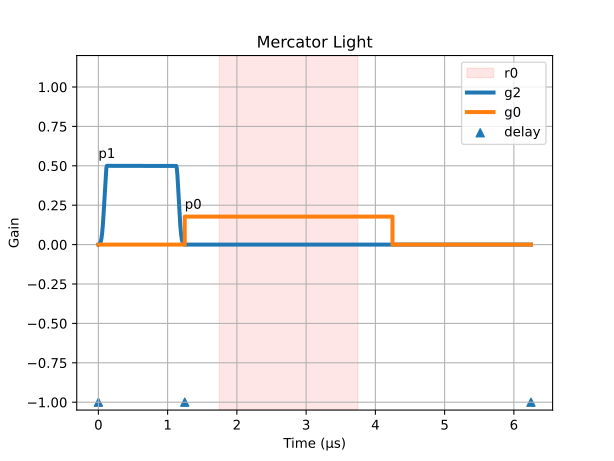
For example, this program defines a QubitSpectroscopy (Two-Tone) experiment with a short relaxation time:
# section 1: Meta Information
hard_avg: 1000
# section 2: Pulse Setup
p0_freq: 5000
p0_length: 3
p0_power: -30
p1_freq: 4000
p1_style: flat_top
p1_sigma: 0.05
p1_length: 1
p1_gain: 0.5
# section 3: Readout Setup
r0_p: 0
r0_length: 2
# section 4: Execution Steps
steps: # using syntax sugar here
- type: pulse
  p: 1
  g: 2
- type: delay_auto
- type: pulse
  p: 0
  g: 0
- type: trigger
  t: 0.5
- type: delay_auto
  t: 2
This program generates the following pulse sequence, plotted by quick.Mercator.light:
More examples, often using variable insertion via
quick.evalStr, are available in the default experiment programs.
Meta Information
Defines program repetitions and averaging. Custom key-value pairs are allowed if they don't conflict with existing keys.
hard_avg: 1        # On-board (FPGA) averages.
soft_avg: 1        # Software (Python) averages.
rep: 0             # Repetitions without averaging (returns all data).
hard_avgandrepare incompatible with time-series acquisitionacquire_decimated.
Pulse Setup
Define pulses. Properties are prefixed with px_, where x is the pulse index (e.g., p0_).
p0_freq: 5000      # (REQUIRED) Frequency (MHz).
p0_gain: 0         # Gain [-1, 1].
p0_nqz: 2          # Nyquist zone [1|2]. Use 1 for DC/low frequencies.
p0_mode: oneshot   # Pulse mode: `oneshot` or `periodic` or `last`
p0_style: const    # Pulse style: `const`, `gaussian`, `DRAG`, `flat_top`, `stage`, `arb`.
p0_phase: 0        # Phase (degrees).
p0_length: 2       # Length (µs).
p0_delta: -200     # Anharmonicity (MHz) for DRAG pulse.
p0_mixer: None     # Mixer frequency (MHz) for up/down conversion.
p0_mask: None      # Channel mask [list] for multiplexed (mux) pulse.
p0_stage: []       # Stages `[amplitude, time]` for `stage` style pulse.
p0_idata: None     # I data for `arb` pulse (DAC samples, [-1, 1]).
p0_qdata: None     # Q data for `arb` pulse (DAC samples, [-1, 1]).
p0_ibias: 0        # I bias value (DAC samples, [-1, 1]).
p0_qbias: 0        # Q bias value (DAC samples, [-1, 1]).
Note:
modeis not applicable for flat_top pulses.ibiasandqbiasare not applicable forconstpulses.
Syntax Sugar (optional):
p0_power: -30      # internally use quick.dB2gain, will overwrite `p0_gain`.
p0_sigma: 0.05     # Gaussian std (µs) for `gaussian`/`DRAG`/`flat_top`. Defaults to p0_length/5.
p0_phrst: 0        # Phase coherent reset [0|1].
Mixer Frequency on Interpolated Channels:
To achieve phase coherence during readout pulse frequency sweeping on interpolated channels, set p0_mixer to a fixed value (in the middle of the sweeping range). If your sweeping range is wider than 1000 MHz, consider set p0_mixer to int(p0_freq/1000)*1000 + 500. You don't need to fix mixer for non-readout pulses or non-interpolated channels.
Periodic and Last Pulse:
When p0_mode is set to periodic, the pulse repeats continuously even after the end of the pulse sequence. When p0_mode is set to last, the last pulse sample will continue after the pulse ended. In both cases, it will indefinitely run until another pulse is emitted from the same generator to overwrite it. To stop it, you can manually call soc.reset_gens() in Python to stop all generators.
Multiplexed (mux) Pulse:
Use lists of matching lengths for freq, gain, and phase. Mux generator is configured by the last-played pulse on that generator. length and mask can be set individually.
Gain range scales with the number of tones: [-1, 1] for 1 tone; [-0.5, 0.5] for 2; [-0.25, 0.25] for 3-4; [-0.125, 0.125] for 5-8.
p0_style: const    # Only `const` style is supported.
p0_freq: [5500, 6000, 6500]
p0_gain: [0.25, 0.25, 0.25]
p0_phase: [0, 0, 0]
p0_length: 2
p0_mask: [0, 1, 2] # Defaults to all channels.
Note: A multiplexed readout must be set by frequency besides linking to a pulse.
Multiple Stage Pulse:
p0_style: stage
p0_stage: [[1, 0.1], [0.3, 1], [-1, 0.1], [0.1, 0.1]] # List of [amplitude, time].
p0_sigma: 0.01     # Standard deviation (µs) for Gaussian filter.
Note:
Total length = (sum of stage times) + 8*sigma, padded to the next clock tick. The maximum amplitude of non-constpulses can be up to 2x weaker than aconstpulse of the same gain.
Pulse Length Truncating and Padding:
For pulse style stage and arb, the length property is defaulted to null (None in Python). If length is set, the pulse will be truncated or padded to match the specified length. If the specified length is shorter than pulse length, the pulse will be truncated. If it is longer, the pulse will be padded with zeros at the end.
Readout Setup
Configure readout (ADC) channels. Properties are prefixed with rx_, where x is the channel number (e.g., r0_).
r0_freq: 0         # (REQUIRED) Readout frequency (MHz).
r0_length: 2       # Readout length (µs).
r0_phase: 0        # Readout phase (degrees).
Syntax Sugar (important):
r0_p: 0            # Link to a pulse for down-conversion frequency.
                   # If used, `r0_freq` is not required (except for mux readout).
                   # `r0_length` defaults to the linked pulse's `length`.
Execution Steps
Defines the sequence of operations. Steps are specified with a flat i_ prefix (e.g., 0_type), where the index i must be consecutive starting from 0. Execution stops at the first missing index. A more convenient list format is also available (see Syntax Sugar below).
0_type: pulse      # (REQUIRED) Step type [options see below].
0_p: 0             # (for `pulse` type) Pulse index.
0_g: 0             # (for `pulse` type) Generator channel.
0_t: 0             # Time offset (µs) from last delay.
Step Types:
pulse: Play pulsepon generatorg.trigger: Trigger readout on channelsrs(defaults to all).wait: Wait until absolute timet.wait_auto: Wait for all channels and readouts to finish, plus offsett.delay: Delay for durationt.delay_auto: Delay for durationtafter all channels and readouts finish.goto: Jump to another step.pin: Trigger digital pins specified bypins(defaults to[0]).
Trigger
Trigger ADC readout. Note that the ADC has a time delay compared to the pulse, so you might always need an offset t to match the readout window for the correct readout pulse. A program MUST have at least one trigger step, no matter whether you care about the data or not.
Delay
Without using delay, all steps respect the same time axis regardless of their orders. delay can offset the origin of time by t, while delay_auto can automatically set the origin after all previous steps finish, plus a given offset t.
Goto
The goto step jumps to another step to repeat a block of operations.
Note:
gotois not a runtime jump. It unrolls the loop during Python compilation, generating a linear sequence.
Conditional Pulse
The protocol supports conditional pulses (e.g., for active reset) that execute based on the measured I-quadrature data from the last readout.
3_type: trigger    # Trigger acquisition.
4_type: wait_auto  # MUST wait for data to be available.
4_t: 0.1           # extra time to wait for the result computation.
5_type: delay_auto # Delay the time axis to align with the wait
5_t: 0.1           # must be the same value as in the wait_auto step.
6_type: pulse      # Conditional pulse.
6_p: 1             # Play pulse p1...
6_g: 2             # ...on generator g2 if condition is met.
6_threshold: 0     # I-data threshold.
6_r: 0             # Readout channel to check (default 0).
In this example, the pulse p1 at step 6 is played only if the I-data from readout channel r: 0 (triggered at step 3) is above the threshold.
Syntax Sugar (Recommended)
The steps list is a convenient alternative to the flat i_ format. The Mercator class first flattens this list into the i_ format. Any explicit i_ properties will override values from the flattened list, allowing for a hybrid approach.